Showing posts with label My Writing Nook App. Show all posts

Monday, December 6, 2010

My Writing Nook is now My Writing Spot

FOR IMMEDIATE RELEASE
Contact: Peter de Tagyos
Email: mywritingspot@gmail.com

NOOK PROVES TOO UNCOMFORTABLE FOR WRITING APP. ESCHEWS CRANNY AND HITS THE SPOT.
Independent developer changes app's name following bookseller's sabre-rattling.

Independent software developer PT Software Solutions is announcing a name change for their popular writing app My Writing Nook. Henceforth, the app will be named My Writing Spot. This renaming is in response to pressure from an ignoble bookseller pushing a device whose name is a common English word. The updated web app goes live today at http://www.mywritingspot.com, and free updated releases of the mobile apps are available for iPhone/iPod/iPad and Android today in their respective app stores.

"We've chosen to look at this as an opportunity," said developer Peter de Tagyos. "With all the features that we've added to the app in the latest release and over the past year, we've outgrown our little nook. Our current apps really do hit the sweet spot for writers, providing a fast, distraction-free writing environment that is easy to use anywhere. We'll leave the nooks to the little guys."

My Writing Spot also has a shiny new logo (as seen above) to go along with the new name.

For more details about the My Writing Spot name change and a bit of snark, visit http://www.mywritingspot.com/whats-in-a-name

My Writing Spot (formerly known as My Writing Nook) is a popular web and mobile app dedicated to helping writers "write simply anywhere." The free web app can be found at http://www.mywritingspot.com, and there are mobile versions available for iOS and Android devices.

If you'd like more information about this, or to schedule an interview with Peter de Tagyos, please email Peter at mywritingspot@gmail.com

Saturday, October 9, 2010

Updated Android app in the Market today

I just published the 1.3.0 release of My Writing Nook for Android devices to the Android Market. This release greatly improves landscape writing mode for devices with on-screen keyboards, and updates the color scheme to match the iOS apps.

I have also added auto-correction to the editor, which should provide a boost to your productivity.

I'm planning several more enhancements in the coming weeks, but I wanted to get these useful improvements to you as soon as possible.

Enjoy!

Saturday, October 2, 2010

A totally rad endorsement from an 80s icon!

I want my AppTV

OK, this is a trip, so I have to share. As someone that grew up in the 80s and can remember the early days of MTV, I was surprised to receive an email today from non other than former vee-jay Adam Curry.

Apparently, Adam has moved from the small screen to the very small screen, and hosts a daily review program for iPhone/iPod touch apps. It's called Adam Curry's Big App Show, and Adam was writing to tell me that today he reviewed My Writing Nook. Whoa. Wha'choo talkin' bout, Willis?

I grabbed the Big App Show app from the App Store (it's free) and, well, there was Adam superimposed on my app.


Adam could have done his homework before reviewing the app, because he gets a few things wrong (the app does NOT sync with Google Docs - it syncs with the web app at http://www.mywritingnook.com) and he can't figure out how to rearrange documents in the doc list (by using document groups), but overall he gives it a pretty good review.

I can't complain too much. I mean, my app just got reviewed by an MTV vee-jay. That's just totally rad, y'know? I feel like such a rock star. I think I'll go destroy a hotel room or something. Hasta la vista, baby.


Friday, October 1, 2010

My Writing Nook Anniversary - plus an iPad update

Today is the one year anniversary of the My Writing Nook iPhone app. The past year has been very satisfying - it's great to see that so many of you are enjoying the app. Thanks for your support and encouragement throughout the last year - you've helped to make My Writing Nook the best novel writing app on the iPhone, iPad, and iPod touch.

I'd also like to announce that the 1.0.7 release of My Writing Nook for iPad is now available in the App Store. This release includes the same delete synchronization and document conflict resolution features that I described in my previous post about the latest release for the iPhone/iPod touch. Enjoy the silky smoothness of the latest release.

Happy writing!

Tuesday, September 28, 2010

iPhone app update - less conflict, no zombies, more stealth

I'm pleased to announce that version 1.8.3 of the iPhone/iPod app hit the App Store this evening. It's chock-full of enhancement goodness, just in time for NaNoWriMo. My Writing Nook continues to be the best novel writing app for the iPhone/iPod touch.

Dark & Stormy night mode just might turn you into a plot ninja
Turn on dark & stormy night mode for the ultimate in stealth writing. This feature has been brought over from the iPad version of the app, and switches the interface to display white text on a black background. The ultimate in distraction-free writing, or just spooky? You be the judge.

There were a few rougher edges that existed in the previous versions of the app, and with the 1.8.3 release, those edges have been polished and made smooth.

Kills zombie documents dead!
The first enhancement is delete synchronization. If you wanted to delete a document in previous versions of the app, you would need to delete it on both the device and the web app. This was awkward, and led to many questions about documents "coming back from the dead."

With delete synchronization, you need only delete a document in one place. There are no more zombies in My Writing Nook. If you want zombies in your app, you'll have to look elsewhere.

Conflict resolved
When you make changes to a document in the app and on the web without synching, you create a document conflict. This means that since both versions of a document are changed, the app doesn't know which one to keep.

Previous versions of the app would simply do nothing, since I believed that this was better than possibly choosing the wrong version to keep. But while this protected your data, it was admittedly a bit clumsy.

With the 1.8.3 release, My Writing Nook will now detect a document conflict and will inform you of the fact by adding an alert icon to the appropriate row in the document list. Tapping on this alert icon will bring you to the conflict resolution screen, which will allow you to view both versions of the conflicted document and decide which one to keep. You no longer need to go to the web app to resolve doc conflicts - you can do everything from your iPhone/iPod touch.

Retinawesome
While this update is all about smoothing out the rougher edges, it's also about sharpening. I've gone through and updated all the graphics for the retina display on the iPhone 4 and latest-generation iPod touches. Now the icons and graphics are really sharp. Handle with care, lest you hurt yourself. You've been warned.

With this update, My Writing Nook becomes even easier to use. They said that it couldn't be done, but when have we ever listened to them?

iPad users - don't fret! A similar update for the iPad version of the app should be hitting the App Store in the next few days.

Enjoy the update, and if you have a moment or two to spare, please leave a review in the App Store.

Tuesday, August 24, 2010

Summer Update

First off, sorry for the lapse in time since my last posting. Such opening sentences are often death knells for blogs, but I want to assure you that isn't the case here. I haven't been resting on my laurels. I've been busy planning and implementing new features for My Writing Nook, and unfortunately this blog has suffered as a result. I plan to get back to a more regular updating schedule once I get this current batch of enhancements out the door. There have been lots of exciting developments in the publishing landscape, and I am looking forward to discussing them in future posts.

So what have I been so busy at work on lately? Well, I've been listening to your helpful feedback and comments, and have been working on improving the rougher edges of the apps, while at the same time building in some of the most-requested features. The future is bright for My Writing Nook, and it will continue to be the best app for writing on the web or on the go with your iPhone, iPad, or Android device.

For both the iPhone and the iPad apps, there are vast improvements in the detection and resolution of document conflicts. You'll soon be able to resolve such conflicts right from within the app. I'm also adding delete synchronization, so previously deleted documents won't keep coming back from the dead. No more zombie docs!

For the iPad app, I'm working on full-screen landscape mode, which should be cause for much rejoicing, since it is one of the top requested features. It's a fairly large change, due to how the frameworks work, but is well worth it.

The Android app will be brought up to similar levels of functionality as its iOS brethren. As a solo developer, it can be tough to keep several apps aligned with respect to feature sets, and the Android app will be getting some necessary TLC.

Don't worry - I haven't forgotten about the web app. You'll soon be able to download all your documents in one fell swoop, instead of one at a time. Easy backups!

I'm also rethinking the organizational features of the app - trying to maintain the ease of use while enhancing the flexibility and functionality. It's a tricky balancing act, and I want to make sure that I get it right.

My current plan is to have new releases out in plenty of time for NaNoWriMo preparation. I'm excited about the coming enhancements, and I hope you will be too.

Saturday, May 29, 2010

New version of My Writing Nook for iPad now available

I'm happy to announce that a new update of My Writing Nook for iPad is now available in the App Store. I'm really excited about this update, since I've added some helpful and fun new features. My Writing Nook continues to be the best app for writing on the iPad.

Always-visible word count - previously the word count was not visible when the on-screen keyboard was showing. Now you can see how prolific you are at any time.

TextExpander touch integration - boost your productivity with TextExpander touch snippets. You'll need to have the TextExpander touch app to take advantage of this feature, but it's well worth your while if your writing lends itself to using repeatable blocks (for example - this would be great for screenplays).

Finally a bit of fun. I've added something called Dark and Stormy Night mode. This changes the color scheme for the app to be black with white text. Get your stealth on and become a plot ninja!

I hope that you enjoy the new features. As always, this is a free upgrade for those that already own My Writing Nook for iPad.

Thursday, April 15, 2010

New Release - My Writing Nook iPhone App - Features Galore!

I'm happy to announce that the 1.7.0 release of My Writing Nook for the iPhone is available in the App Store. For those of you who have already purchased the app, it's a free upgrade, and it is jam-packed with new features! My Writing Nook continues to be the best app for writing a novel on an iPhone.

So what's new? Oh, let me count the ways...

1. Password Protection.
There's now an optional password protection feature that can be enabled on the Settings page. Protect your work until you're ready to share it with the world.

2. Change Font/Font size.
You can now select your preferred font and font size for writing on the Settings page.

3. Single tap to change Document Groups.
On the My Documents page, the document group buttons are larger for easier tapping. Also, you no longer need to be in Edit mode to change a document's group. Just tap on the document group button for the desired document and the selection page will appear.

4. Larger dictionary and thesaurus buttons on the Word Lookup page for easier tapping.

5. Link to the MWN help page on the Settings page. If you have run into a problem or have a question, tap this link to jump right to the MWN help.

There's also a link that will allow you to rate the app in the App Store. If you enjoy the app and can spare a few moments, please tap this link and write up a quick review. It's much appreciated!

I hope everyone enjoys these new features.

Sunday, April 11, 2010

Writing on the iPad with My Writing Nook

For the past few years, I've been on a quest. A quest to find the perfect set of writing tools. I've been down many paths during this quest, had several close calls, had my hopes raised up only to have them come crashing down to Earth. At times I've thought that perhaps finding the Holy Grail would be easier.

OK, I'm being a bit melodramatic here, but my point is, I've been looking for the perfect set of writing tools for a long time now. I'm happy to say that I have finally discovered them.

I think that the iPad is the ideal writing device. Especially when paired with an app like My Writing Nook for iPad. I'm not just tooting my own horn here - I am honestly excited about how well the app and the iPad fit into my writing life. I feel like I've finally discovered the perfect set of tools for writing a novel or working on a writing project.

Here's my current novel writing set up:
- an iPad with WiFi and 16GB of memory.
- Apple bluetooth keyboard.
- Apple iPad case.

Right now, I'm writing this post on my iPad. I've got My Writing Nook open, and I'm happily typing away on my bluetooth keyboard. For short notes, the on-screen keyboard is fine, but for serious writing sessions the bluetooth keyboard is invaluable. I've got Apple's iPad case, which allows you to prop up the pad at a slight angle, or stand it up like a picture frame.

So why does the iPad succeed where so many other devices have failed?

It's portable. I can put it in my small messenger bag with plenty of room to spare. The bluetooth keyboard is equally slim and portable.

It's fast. The iPad is instantly on with the press of a button. There's no waiting around for the computer to wake or boot up. The interface is responsive and snappy.

The battery life rocks. This was one of my biggest problems with netbooks. While some of the newer netbooks have much better batteries, the average netbook battery only lasts 3 hours or so. The iPad battery will last the entire day.

It's quiet. There's no fan noise, and the device never gets warm. No lap burns here.

The bluetooth keyboard is awesome. It's full-size, and yet still very light and portable. I have yet to find a netbook keyboard that I liked. I love my Apple bluetooth keyboard.

The software is great. Obviously I'm a little biased, but My Writing Nook for iPad has exceeded even my expectations. Every time I launch the app it makes me smile. The iPad is the device that this software was meant for.

In summary, I'm totally thrilled with my new novel writing toolset - the iPad, a bluetooth keyboard, and My Writing Nook for iPad. It's a writer's (well, at least it's *this* writer's) dream come true. And with that said, I'm going back to writing my novel.

Monday, April 5, 2010

New Feature for iPad - password-protect your writing!


I'd like to announce an update to the My Writing Nook for iPad app. You now have the ability to password-protect the app. With the tight deadlines in the days before the launch I didn't have time to include this feature, and I'm happy that I've since had the time to build it in. Kudos also go to Apple for a lightning-fast approval process.

This feature is optional - you don't have to enable it. However, if you want that extra layer of protection for your writing, My Writing Nook has you covered.


For you iPhone writers out there - the next task on my plate is to add a password-protection feature to the iPhone version of My Writing Nook. Look for that in the next week or two.


Thursday, April 1, 2010

My Writing Nook for iPad

I'm very excited to announce that My Writing Nook for iPad is now available for sale in the iTunes App Store. I've said before that I feel that the iPad will be the perfect device for writing your novel on, and I also believe that My Writing Nook for iPad is the perfect app for writing simply anywhere on your iPad.

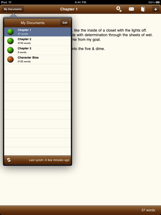
Now that the iPad's arrival is imminent, and Apple has removed the veil of secrecy, I can present you with some screenshots from the app. Or you can check out My Writing Nook for iPad in the iTunes App Store.


As you can see, My Writing Nook for iPad is a complete rewrite of the iPhone app - taking advantage of the iPad's form-factor and greater processing power. It's lightning-fast, and even easier to use than before. All the common actions are just a tap away, allowing you to maintain your flow while writing. No distractions here.


You can now customize the writing font and font-size, and you'll love the built-in spell-checker.


As always, synching with the My Writing Nook web app is a breeze - just tap the synch button and you'll always have the latest version of your novel.


Coming Soon

Due to the tight deadlines around the iPad release, we weren't able to squeeze in all the features that we wanted, but there will be a new release coming very soon (in the next week or so). This release will contain one of the most-requested features - a way to password-protect the app. So be sure to look for that in the next few days.

Until then, enjoy My Writing Nook for iPad.

Tuesday, March 23, 2010

T-minus 11 days until the iPad

I apologize for the recent radio silence. I've been very busy lately working on My Writing Nook for iPad. I can't share any details yet, other than that I think that the iPad is the perfect device for an app like My Writing Nook.

I have completely reworked the design and workflow for MWN to take advantage of what the iPad offers. At the same time, I've kept the writing environment distraction-free and easy to use. My Writing Nook for iPad is excellent for writing drafts of your novel, jotting down quick notes or ideas, and keeping everything in synch across your various computers and mobile devices.

All the existing features from the iPhone app will be included, and I've also managed to add a few new features that will only be available on the iPad.

April 3rd is almost here! I can't wait.

Friday, February 12, 2010

What's next for My Writing Nook?

I've been quite busy here at the My Writing Nook labs. OK, there aren't actually any labs, but saying that sounds kinda cool, so please indulge me. With this week's 1.6 release of the MWN iPhone/iPod touch app, the roll out of the shiny new document groups feature is complete. I hope that everyone is enjoying that feature.

I've got a lot of things planned for MWN, so I thought I'd take a few moments and share some of them with you.

Very near term happenings
I'm excited to announce that very soon there will be a My Writing Nook application available to devices that run Android. That means that your shiny new Droid or Nexus One phone will be yet another place that you can Write Simply Anywhere.

I'm putting the final touches on the app now, so I'd expect to get it into the Android Marketplace within the next two weeks or so. It's been an interesting experience - doing Android development. Once the dust settles, I plan to write a post comparing iPhone development to Android development.

Near term happenings
Once the Android app is out the door, I will turn my focus to working on the iPad version of My Writing Nook. I think that MWN is an application that will be very well-suited to the iPad, and I plan to be in the App Store from day one.

But what about the iPhone/iPod app?
Don't worry, I won't be neglecting the iPhone app. For the 1.7 release, I'm planning to integrate support for TextExpander touch into the app, which will allow you to really boost your word count. There will also be a few other minor features.

And the web app?
The web app continues to be fast and stable. It's the foundation of the entire MWN empire. I've got some interesting things planned for the future, but don't want to share them just yet.

It will be an interesting next few months here at MWN. I hope you'll come along for the ride.


Tuesday, February 9, 2010

iPhone App version 1.6 is out - Document Groups!

The 1.6 release of the My Writing Nook app for iPhone/iPod touch hit the App Store tonight. This release includes the much-requested document groups feature.

You'll also notice that I've updated the logo. It's now much crisper, since I reworked it and it's a much higher resolution now. Hmm.... now why would I possibly need a new, higher resolution logo...

As always, I recommend that you do a synch with the web app before you grab the update, just in case. Enjoy!

Friday, January 29, 2010

New Feature - Document Groups

I have just finished rolling out a new feature to the My Writing Nook web app - Document Groups!

Probably the feature most requested for MWN has been for some way to collect several documents together into a project. With document groups, that request has been fulfilled.

If you look at the document list, you'll notice that for each document, the word count checkbox is gone. In its place is a round button, colored to represent which document group that document is a member of. Initially, all these buttons are black (that's the default value). To change a document's group, simply click on the button. This will bring up an overlay that will allow you to choose which group to assign the document to.

Documents in the same group stick together in the document list. Documents in the same group contribute their word count to the word count total for the group. Finally, document groups are sorted in the order that they are shown in the overlay.

When designing this feature, I tried to strike a balance between functionality and ease of use. I think that I've achieved that goal, but I'd like to hear what you think of the document groups feature.

iPhone users - fear not! I have submitted an update to the MWN iPhone app and it is currently pending approval. I'm hoping that the update will appear in the app store within the next two weeks.

If anyone runs into problems or has any questions, feel free to drop me an email at mywritingnookapp@gmail.com.

Happy Writing!

Friday, November 20, 2009

Bring it on, GQ!


I cannot put into words how satisfying it is to see something that I have built being used and enjoyed by so many people. The My Writing Nook iPhone app has been steadily rising in the rankings of the App Store, which has been amazing to watch.

It's already passed by the app made by the people of The Secret®, and now it's broken into the top 10 (in the Lifestyle paid category) and has got its sights set squarely on GQ. Look out GQ! We're coming for you!


Wednesday, November 18, 2009

My Writing Nook is "What's Hot"!

Just wanted to share some exciting news: yesterday, the My Writing Nook iPhone app was featured in the "What's Hot" section of the US App Store, putting it right there on the front page!

It's still there today, and MWN has climbed to the #22 spot in the top 100 paid apps in the Lifestyle category.

I shall now do a happy dance. :)

Sunday, October 4, 2009

Simplicity is not a bug

Several people have made comments comparing the feature set of My Writing Nook to Word or Google Docs. They ask "why can't I just use Google Docs?" My answer to them is - you can. If Google Docs works for you, great! Personally, I found Google Docs to be too much tool for the job I wanted to do - something akin to using a pile-driver to nail two boards together.

Occam's Razor - the simplest answer is usually the best.

The longer I have been in the software business, the more I have come to appreciate simplicity in design. Just because an application has more features doesn't mean it's better - in fact, oftentimes the opposite is true. More features means more code, and code that is often more complicated. This makes the code harder to understand and maintain, leading to more bugs.

Let's look at things from the user's perspective. The user wants software that allows them to do their work easily and efficiently - that's their goal. They aren't necessarily interested in having all the bells and whistles - only the ones that are most useful for task at hand. Bells and whistles are for the marketing department, not the user. The user only wants to achieve their goal.

The goal for writers is to write. Any feature that does not help the writer toward that goal is an unnecessary feature, in my opinion. If an application forces the writer to wade through countless toolbars or menus to find the feature that they want, it is not helping them achieve their goal efficiently.

"I have made this letter longer than usual, only because I have not had time to make it shorter." - Blaise Pascal

For the users of My Writing Nook, the goal is stated right there on the home page - Write simply anywhere. I kept that goal in mind as I decided which features to provide and (more importantly) which features to eliminate.

The feature set for My Writing Nook is intentionally small. It contains only those features that allow a writer to write, simply, from anywhere. Anything else is superfluous.

To those people that still wish to compare MWN to Google Docs or Word, I offer the following hypothetical.


An illustrative tale of two tools

The scenario: A man is camping. He catches a fish and would like to clean it and cook it for his dinner. Let's follow him down two hypothetical paths:

Path 1: The man has a simple hunting knife.

1. He uses the knife to clean the fish, then cooks his dinner. Yum!


Path 2: The man has a swiss army knife.

1. He takes the knife out of his pocket and is immediately confronted with a decision - which of the blades to use.

2. He fumbles around for a bit, perhaps opening one or two blades to determine their applicability to the problem at hand.

3. Ooh! There's a magnifying glass here. He didn't realize that before, and spends a few minutes playing with it.

4. Getting back to the task at hand, he picks a blade and opens it. He starts to clean the fish.

5. While he's cleaning the fish, he wonders if perhaps another blade would be even better at cleaning the fish.

6. He cleans the blade he was using, closes it, and opens a different blade to try.

7. Finally, the fish is clean. Unfortunately, it's now too dark out to see what he's doing, and he trips over a rock, dropping the fish in the dirt.

8. The man goes to bed hungry.


Sometimes the lack of features is a feature in itself.


Thursday, October 1, 2009

My Writing Nook - Yes, there's an app for that!


I'm proud to announce that My Writing Nook for the iPhone/iPod touch is now available in the App Store. I'm really excited about this - I think that it's a perfect complement to the MWN web app.

The two apps work in concert to keep your docs in synch. Now you can have your latest work with you wherever you go. I think this will be really handy for jotting down notes on the go, or maximizing your daily word count, which makes it perfect for NaNoWriMo. Whenever you have a few minutes to spare, you can fire up the app and unleash those thumbs!


Or if you've seen enough and just can't wait to get your hands on it - click here to buy it. For the price of a cup of coffee, you can now have the ability to write from anywhere.


Friday, September 18, 2009

Coming Soon

Many of you have asked me about using My Writing Nook on an iPhone. I built the app primarily for use on laptops and netbooks, and paid careful attention to maximizing the use of screen space on smaller screens.

While the iPhone has a full-featured browser, using it with MWN is a less than optimal experience. You've got to zoom in to see what you're doing, and it's just a bit clunky. I never intended for My Writing Nook to be used from an iPhone.

Until now.

I'd like to announce that My Writing Nook will soon be available as an app on the iPhone.

I'm very excited about this - the iPhone app synchs seamlessly with the web app, so that you can always have the latest versions of your documents with you. If you find yourself with a few minutes of down time, you can whip out your iPhone and write for a spell. If an idea strikes, you can jot it down quickly and synch everything up so that when you get back to your computer, your ideas are there.

It will be perfect for NaNoWriMo. You'll be able to add to your daily word counts from anywhere - standing at line, at the doctor's office, at the park.

I'm aiming to have My Writing Nook in the App Store in early October. Watch for updates here.