Showing posts with label mobile. Show all posts

Saturday, January 14, 2012

My Writing Spot - Now on NOOK Tablet and NOOK Color

The My Writing Spot world domination plan continues. My Writing Spot is now the best writing app on the NOOK Tablet and NOOK Color. Now you can read great novels on the NOOK, and then go ahead and write a great novel yourself.

Some of you that have been using the app for a while might see this as an ironic plot twist, but hey, I say it's water under the bridge. Live and let write, I say. The goal of the app is to allow you to Write Simply Anywhere, and the Nook tablets are a nice place to be.

Click on the link below to grab the greatest writing app on the Nook.

NOOK App : My Writing Spot

Wednesday, June 1, 2011

Novel in 30 helps writers become novelists

I took a short break from working on My Writing Spot and created an iPad app that will challenge and motivate you to write a novel.

Novel in 30 is an iPad app for novelists. Writers can set a deadline and target word count, and Novel in 30 will help them stay on track, offering encouragement and motivation along the way. Novel in 30 helps writers become novelists.

For more details about Novel in 30, please visit http://www.novelin30.com

To purchase the app, click this link.

Thursday, April 15, 2010

New Release - My Writing Nook iPhone App - Features Galore!

I'm happy to announce that the 1.7.0 release of My Writing Nook for the iPhone is available in the App Store. For those of you who have already purchased the app, it's a free upgrade, and it is jam-packed with new features! My Writing Nook continues to be the best app for writing a novel on an iPhone.

So what's new? Oh, let me count the ways...

1. Password Protection.
There's now an optional password protection feature that can be enabled on the Settings page. Protect your work until you're ready to share it with the world.

2. Change Font/Font size.
You can now select your preferred font and font size for writing on the Settings page.

3. Single tap to change Document Groups.
On the My Documents page, the document group buttons are larger for easier tapping. Also, you no longer need to be in Edit mode to change a document's group. Just tap on the document group button for the desired document and the selection page will appear.

4. Larger dictionary and thesaurus buttons on the Word Lookup page for easier tapping.

5. Link to the MWN help page on the Settings page. If you have run into a problem or have a question, tap this link to jump right to the MWN help.

There's also a link that will allow you to rate the app in the App Store. If you enjoy the app and can spare a few moments, please tap this link and write up a quick review. It's much appreciated!

I hope everyone enjoys these new features.

Sunday, April 11, 2010

Writing on the iPad with My Writing Nook

For the past few years, I've been on a quest. A quest to find the perfect set of writing tools. I've been down many paths during this quest, had several close calls, had my hopes raised up only to have them come crashing down to Earth. At times I've thought that perhaps finding the Holy Grail would be easier.

OK, I'm being a bit melodramatic here, but my point is, I've been looking for the perfect set of writing tools for a long time now. I'm happy to say that I have finally discovered them.

I think that the iPad is the ideal writing device. Especially when paired with an app like My Writing Nook for iPad. I'm not just tooting my own horn here - I am honestly excited about how well the app and the iPad fit into my writing life. I feel like I've finally discovered the perfect set of tools for writing a novel or working on a writing project.

Here's my current novel writing set up:
- an iPad with WiFi and 16GB of memory.
- Apple bluetooth keyboard.
- Apple iPad case.

Right now, I'm writing this post on my iPad. I've got My Writing Nook open, and I'm happily typing away on my bluetooth keyboard. For short notes, the on-screen keyboard is fine, but for serious writing sessions the bluetooth keyboard is invaluable. I've got Apple's iPad case, which allows you to prop up the pad at a slight angle, or stand it up like a picture frame.

So why does the iPad succeed where so many other devices have failed?

It's portable. I can put it in my small messenger bag with plenty of room to spare. The bluetooth keyboard is equally slim and portable.

It's fast. The iPad is instantly on with the press of a button. There's no waiting around for the computer to wake or boot up. The interface is responsive and snappy.

The battery life rocks. This was one of my biggest problems with netbooks. While some of the newer netbooks have much better batteries, the average netbook battery only lasts 3 hours or so. The iPad battery will last the entire day.

It's quiet. There's no fan noise, and the device never gets warm. No lap burns here.

The bluetooth keyboard is awesome. It's full-size, and yet still very light and portable. I have yet to find a netbook keyboard that I liked. I love my Apple bluetooth keyboard.

The software is great. Obviously I'm a little biased, but My Writing Nook for iPad has exceeded even my expectations. Every time I launch the app it makes me smile. The iPad is the device that this software was meant for.

In summary, I'm totally thrilled with my new novel writing toolset - the iPad, a bluetooth keyboard, and My Writing Nook for iPad. It's a writer's (well, at least it's *this* writer's) dream come true. And with that said, I'm going back to writing my novel.

Thursday, April 1, 2010

My Writing Nook for iPad

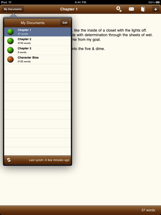
I'm very excited to announce that My Writing Nook for iPad is now available for sale in the iTunes App Store. I've said before that I feel that the iPad will be the perfect device for writing your novel on, and I also believe that My Writing Nook for iPad is the perfect app for writing simply anywhere on your iPad.

Now that the iPad's arrival is imminent, and Apple has removed the veil of secrecy, I can present you with some screenshots from the app. Or you can check out My Writing Nook for iPad in the iTunes App Store.


As you can see, My Writing Nook for iPad is a complete rewrite of the iPhone app - taking advantage of the iPad's form-factor and greater processing power. It's lightning-fast, and even easier to use than before. All the common actions are just a tap away, allowing you to maintain your flow while writing. No distractions here.


You can now customize the writing font and font-size, and you'll love the built-in spell-checker.


As always, synching with the My Writing Nook web app is a breeze - just tap the synch button and you'll always have the latest version of your novel.


Coming Soon

Due to the tight deadlines around the iPad release, we weren't able to squeeze in all the features that we wanted, but there will be a new release coming very soon (in the next week or so). This release will contain one of the most-requested features - a way to password-protect the app. So be sure to look for that in the next few days.

Until then, enjoy My Writing Nook for iPad.

Tuesday, March 23, 2010

T-minus 11 days until the iPad

I apologize for the recent radio silence. I've been very busy lately working on My Writing Nook for iPad. I can't share any details yet, other than that I think that the iPad is the perfect device for an app like My Writing Nook.

I have completely reworked the design and workflow for MWN to take advantage of what the iPad offers. At the same time, I've kept the writing environment distraction-free and easy to use. My Writing Nook for iPad is excellent for writing drafts of your novel, jotting down quick notes or ideas, and keeping everything in synch across your various computers and mobile devices.

All the existing features from the iPhone app will be included, and I've also managed to add a few new features that will only be available on the iPad.

April 3rd is almost here! I can't wait.

Wednesday, February 17, 2010

My Writing Nook now available on Android!


I'm pleased to announce that My Writing Nook is now available for Android-powered phones and devices. If you're reading this on your phone, you can get it here (this link will only work from Android's browser). It runs on all devices that run Android 1.5 and higher.

You can read all about the new version and see some screenshots by visiting the My Writing Nook for Android page.

Happy writing, Android users!

Friday, February 12, 2010

What's next for My Writing Nook?

I've been quite busy here at the My Writing Nook labs. OK, there aren't actually any labs, but saying that sounds kinda cool, so please indulge me. With this week's 1.6 release of the MWN iPhone/iPod touch app, the roll out of the shiny new document groups feature is complete. I hope that everyone is enjoying that feature.

I've got a lot of things planned for MWN, so I thought I'd take a few moments and share some of them with you.

Very near term happenings
I'm excited to announce that very soon there will be a My Writing Nook application available to devices that run Android. That means that your shiny new Droid or Nexus One phone will be yet another place that you can Write Simply Anywhere.

I'm putting the final touches on the app now, so I'd expect to get it into the Android Marketplace within the next two weeks or so. It's been an interesting experience - doing Android development. Once the dust settles, I plan to write a post comparing iPhone development to Android development.

Near term happenings
Once the Android app is out the door, I will turn my focus to working on the iPad version of My Writing Nook. I think that MWN is an application that will be very well-suited to the iPad, and I plan to be in the App Store from day one.

But what about the iPhone/iPod app?
Don't worry, I won't be neglecting the iPhone app. For the 1.7 release, I'm planning to integrate support for TextExpander touch into the app, which will allow you to really boost your word count. There will also be a few other minor features.

And the web app?
The web app continues to be fast and stable. It's the foundation of the entire MWN empire. I've got some interesting things planned for the future, but don't want to share them just yet.

It will be an interesting next few months here at MWN. I hope you'll come along for the ride.


Tuesday, February 9, 2010

iPhone App version 1.6 is out - Document Groups!

The 1.6 release of the My Writing Nook app for iPhone/iPod touch hit the App Store tonight. This release includes the much-requested document groups feature.

You'll also notice that I've updated the logo. It's now much crisper, since I reworked it and it's a much higher resolution now. Hmm.... now why would I possibly need a new, higher resolution logo...

As always, I recommend that you do a synch with the web app before you grab the update, just in case. Enjoy!

Wednesday, January 27, 2010

Implications of the iPad

Wow. Apple debuted the iPad today, and it looks beautiful. Here are my initial thoughts on the device, and its implications:

My Writing Nook - iPad edition
First of all, let me say: there will most definitely be an iPad-specific version of My Writing Nook. I've already read through the developer documents and will be exploring the SDK in the coming weeks.

Rather than simply port the iPhone/iPod app to the iPad, I am completely rethinking the interface to take advantage of the iPad's screen real estate and new interface paradigms. I am really excited about what the device offers - and I think the iPad version of MWN is going to knock your socks off.

iBooks
The iPad also represents a tremendous opportunity for writers. There aren't too many details about the iBook store yet, but I have to believe that Apple will allow independent third-parties to submit their eBooks for sale. Apple has chosen the ePub format, which is a free and open format.

If they use a model similar to the App Store, with 70% of the take going to the author, then the iPad could really be a boon for self-published authors. This is likely the reason why Amazon announced their new royalty plans last week, and others will be forced to follow suit.

Web Fiction
The iPad will also provide a boost for web fiction. With it's form-factor and excellent browsing capabilities, it will make reading web fiction a breeze. No more clunky laptops or netbooks - you can sit in bed and read web fiction like you would a regular book.

I can't wait until this thing ships in March. What do you think? Is the iPad a game-changer?

Saturday, November 21, 2009

Chrome vapor vs. Jolicloud reality

There was quite a lot of buzz this week about Google's new Chrome OS. The operating system was announced several months ago, but Google released more information about it at a small press event on Thursday.

Basically, ChromeOS looks to be an operating system based entirely around the Chrome web browser. It requires very little else, because the intent is that your apps and the vast bulk of your data will live in the Internet cloud.

ChromeOS has certainly made the spotlight currently shining on cloud computing even brighter, but it's not the first OS with such a vision. And right now, it's just that - a vision. The OS isn't expected to be ready until at the end of 2010. In Internet time, that's an eternity.

There is an alternative though, and it's available today (currently in alpha testing). The OS is called Jolicloud, and it's an operating system project with an interesting goal - to "combine the two driving forces of the modern computing industry: open source and the open web". You can read more about their idea here.

I downloaded and installed Jolicloud a few weeks ago on my 1st generation EeePC 701. The Linux-based OS that came pre-installed on the machine was pretty rough around the edges, and kind of a pain to use. Jolicloud is also a Linux-based OS (based on the Ubuntu netbook remix, I believe) but is much more polished, even in its current alpha release.

The interface is slick, and responsive. They've also managed to make the trackpad recognize multi-touch gestures for scrolling, which is really handy. And the WiFi works exceptionally well, right out of the box. Before Jolicloud, I needed to manually turn on the WiFi and wait a few seconds for it to connect. Now it's automatic, and ready for me when the OS boots up.

Perhaps the biggest plus is how easy it is to find and install new applications. Jolicloud provides categorized groups of apps, and installing an app is as simple as clicking the green "Install" button. Uninstalling is just as easy - just click "Remove" and the app is gone.
System updates are equally easy, and can happen automatically if you wish, so you always have the latest and greatest system.

Jolicloud also has some social networking features built right into the OS. When you log into Jolicloud, you can add buddies that are also Jolicloud users. I haven't played with the social features too much, but I'm interested to see where they take them.

I'm pleased to announce that My Writing Nook was accepted into the Jolicloud catalog, in the Office category. I installed it last night, was impressed with the results. I'm really pleased to see how well it integrates. When an app runs, Jolicloud gives it the entire screen, except for a thin menubar at the top. MWN looks really slick within this environment. It's truly uncluttered and distraction-free. Check it out:


The alpha release is currently invite-only. I have a few invite codes, so if you are interested in one, send me an email and I will be happy to send one your way. If you've got a netbook and you're unhappy with the OS it runs, I urge you to check out Jolicloud. If you're not brave enough to just blow away your current OS, you can run just boot and run Jolicloud right off a USB thumb drive.

Jolicloud has gotten me excited about using my netbook again.

Wednesday, November 18, 2009

My Writing Nook is "What's Hot"!

Just wanted to share some exciting news: yesterday, the My Writing Nook iPhone app was featured in the "What's Hot" section of the US App Store, putting it right there on the front page!

It's still there today, and MWN has climbed to the #22 spot in the top 100 paid apps in the Lifestyle category.

I shall now do a happy dance. :)

Wednesday, November 4, 2009

This is what the App Store feels like these days

Perhaps I am being a tad facetious, but this is what the App Store feels like these days. I think it's high time Apple added a new "Adult" category and forced all the 17+ rated apps into it.


But hey - as you can see, the My Writing Nook iPhone app managed to break into the top 100 paid apps in the Lifestyle category. I'm enjoying a nice boost from all the happy NaNoWriMo participants.

Thursday, October 1, 2009

My Writing Nook - Yes, there's an app for that!


I'm proud to announce that My Writing Nook for the iPhone/iPod touch is now available in the App Store. I'm really excited about this - I think that it's a perfect complement to the MWN web app.

The two apps work in concert to keep your docs in synch. Now you can have your latest work with you wherever you go. I think this will be really handy for jotting down notes on the go, or maximizing your daily word count, which makes it perfect for NaNoWriMo. Whenever you have a few minutes to spare, you can fire up the app and unleash those thumbs!


Or if you've seen enough and just can't wait to get your hands on it - click here to buy it. For the price of a cup of coffee, you can now have the ability to write from anywhere.